
GIT 230 Week 6 Illustrator Project – Surfboard
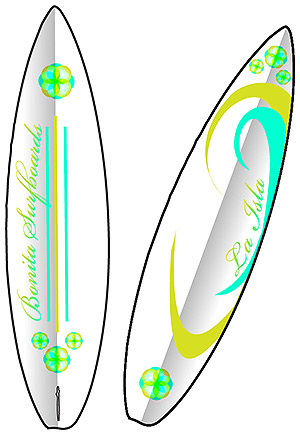
This surfboard concept was designed for all divas who love beach life. I searched online and found surfboard artwork that had the right balance, saved it, and placed in Adobe Illustrator (AI). The image was traced using sketch and expanded. The sketch was cleaned so that only the outlines of the surfboard remained.
Once the surfboard was outlined and expanded, elements of design were created. Circles were copied and rotated to create a round logo style. Two ocean colors were added to the swatch panel and the live paint bucket tool used to fill in the circles in a cohesive pattern. Both overlay and transparency were used. Once the circles took shape and were colored, they were grouped. The grouped circles were copied and the scale tool used to create a uniform look on the front and back.
On the back of the surfboard the pen tool was used to create three lines that were filled with the same two-colored swatches used throughout the design. Bickham Script font was selected and a type on a path tool used to give the “Bonita Surfboard” name a feminine, flowing approach. The text was outlined then a gradient using the two colors chosen. Half of the outline of the back of the surfboard was traced and shading added to give it dimensionality.
The front of the surfboard used the same elements copied from the back only reflected. Two wavy designs were created using the pen tools and each filled with both design colors.
 riaona
Leave a comment